Posted by:


If you are a developer of mobile apps, a milestone has until now somewhat quietly become a reality: Google Play now has the same amount of apps as iTunes, standing over 700,000 apps strong.  App discovery is a huge challenge, which probably means developers may be more likely to cry than cheer when hearing the news.

In order to make money on your application, mobile developers now need to consider spending on marketing and user acquisition, language localization, and increased distribution, as the fight for user attention is ever increasing.

Marketing spend is perhaps the most expensive piece, where Distimo in May found that in order to stay in the top 25 on iTunes free chart, you need 25,300 daily downloads. When costs per installs range from $1.54 to up to $3.50 for the big spenders, it is a game very few developers can play.

Language localization has been in the spotlight lately with several reports highlighting the benefits of localization. Distimo found that localizing apps would boost downloads by 128 percent a week after releasing localized versions.  Earlier research showed that for instance in iTunes in Russia, only four percent of the apps are localized but they account for over 70 percent of the revenue on paid apps.  Specialist players like Irish based Tethras have entered the arena to provide dedicated language translation capabilities to app developers, as more and more developers are realizing the importance of localization.

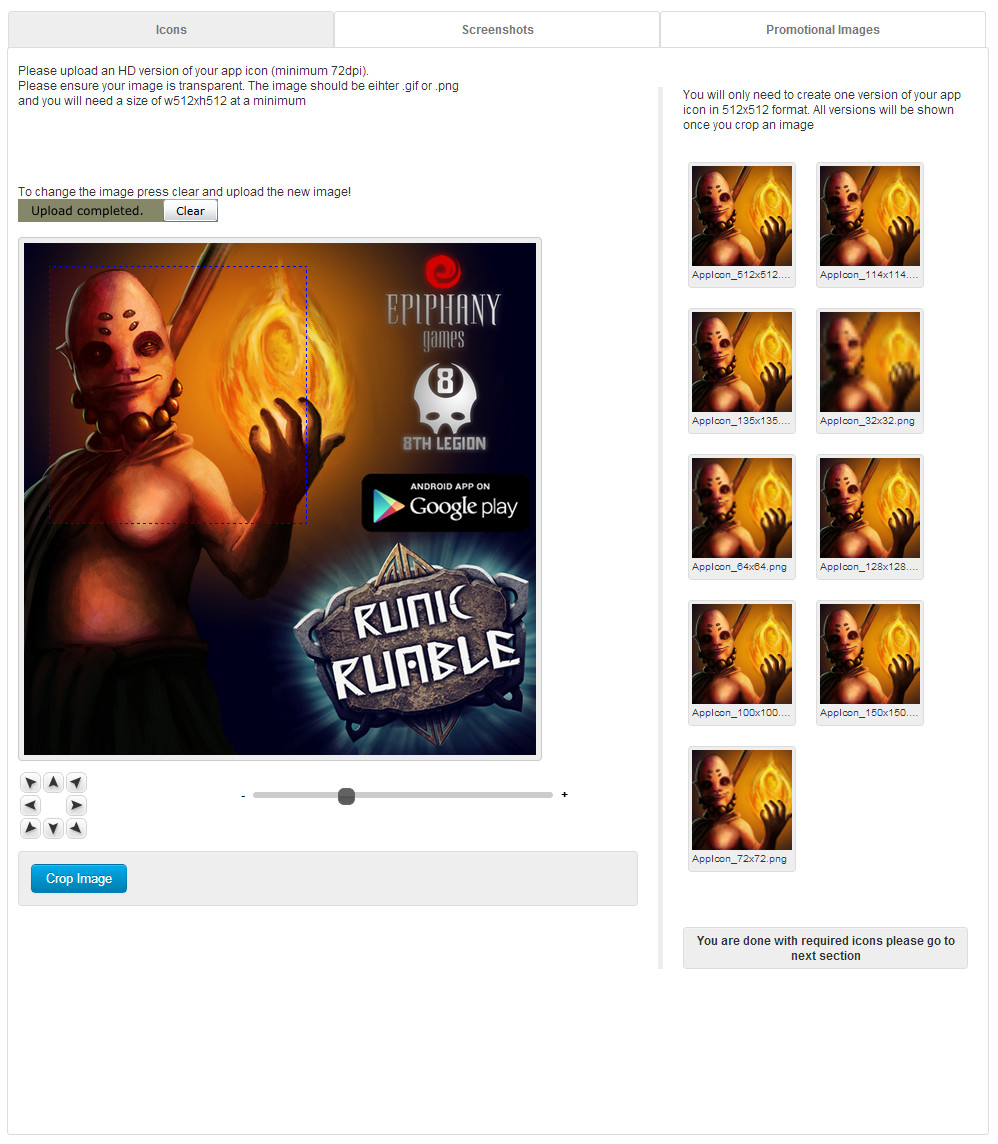
As mobile operator portals are becoming marginalized (according to Vision Mobile’s Developer Economics 2012 report, operator portals saw a 47 percent drop as the primary channels for developers from their 2011 survey), and more developers now use app stores as their primary channel than all other channels combined. However, despite app discovery being a huge challenge, most developers only distribute their apps in one or two app stores, as distribution is time consuming and often a painful process. Companies like Australia based CodeNgo aim to help developers in this process, by taking away the pain associated with distributing to all these stores, by having one submission form reach a wide variety of local and global app stores, and a dedicated tool helping developers to avoid having to create an endless array of screenshots. CodeNgo has even partnered with Tehtras to integrate language translation as part of the submission process.
 2013-01-23-Image-Resizer Growth of Google Play leads to app store innovation

The CodeNgo Image Resizer tool shortens the time developers spend creating promotional images of their applications (CodeNgo photo, January 2013).

So while Google Play and iTunes are quickly becoming a grave yard for applications, many in the industry recognize the need for a healthy eco-system of local and international app stores to offer cost effective channels for reaching consumers. Innovative startups and established players continue to attack the challenge of app discovery. If you are a developer, now may be the right time to take advantage of the new opportunities to get your app discovered.

Posted by:


From Samsung

Dear Seller,
Thank you for using Samsung Apps Seller Office; we deeply appreciate your support for our service.Please note that Seller Office is planning to change the size of icon images, as below, so that it will support the registration of devices with higher resolution; so please check the notice to reduce the number of mistakes made when registering apps.
Effective from : Thursday 31st, January
 – Size change : (Before) 135X135 pixel -> (After) 512X512 pixel
 – More supported formats: (Before) GIF, JPG -> (After) GIF, JPG, PNG
 – Maximum size allowed: (Before) Less than 500 KB -> (After) Less than 1,024 KB
When making revisions, icons must be edited to fit the new size (if you don’t make any revisions, the current size can be kept).
If you only change the icon image when making revisions, please enter the details of the change in your Comments to the Certification Team to make certification faster.

Posted by:


From Samsung:

Dear seller,
Thank you for being a part of Samsung Apps.Please note that the following improvements will be made to the service to reflect your valuable opinions of using Seller Office.
Effective from
 – Thursday 13th December, 2012
Major changes
1. Multiple Binary
 – You can upload up to 10 binary files to an application.
 – Target OS: bada and Android (except for other OS and bada widgets).
2. Flexible Price
 – You can choose the price of your applications and items at your own discretion.
 – You can configure the price to be automatically converted to foreign currencies based on the exchange rate of when you entered the standard price.
However, the recommended Phone Bill Price is automatically set to the highest approximation if you are using Phone Bill because Phone Bill Price is fixed by country.
3. Service now available in more countries
 – New countries with paid stores: New Zealand and Nigeria.
 – New countries where P-SMS payment can be used: Philippines, Kuwait, and Qatar.
4. Other Information
 – The Add button in Trial will be removed from applications that are On Sale and In Certification.
 – The NFC option will be added to Device Recommendation (Auto detection: Android, Direct input: bada).
For questions and comments, please use Seller Office > Support > Contac Us
We will continue to work hard in order to provide you with the best possible service.
Thank you.
Your Seller Office Team.

Posted by:


From Google:

We’re writing to let you know that Google Play will be supporting tax-inclusive prices in Brazil. Prices set in the Developer Console must be tax inclusive. We encourage you to log into your Developer Console  and make any necessary adjustments to your pricing. To learn more, please visit our Help center at http://support.google.com/googleplay/android-developer/bin/answer.py?hl=en&answer=138000

We would also like to remind you that we have introduced Buyer’s Currency in Brazil. All prices for this locale will be in the Brazilian Real (BRL) currency.

IMPORTANT:  If you have not manually set pricing for Brazil in the Google Play Android Developer Console by Dec 17, 2012, Google Play will automatically assign Brazilian Real prices for your products. Google Play assigns a Brazilian Real price based on the price of your app in your home currency, converted to Brazilian Real using the exchange rate on that day. Google Play will also automatically add taxes based on the tax rate you defined in the Google Checkout Merchant Center.  This is a one-time conversion associated with the transition to the new Buyer’s Currency model. If you have already set your per-currency prices manually, Google Play will not override them.

You can continue to set and adjust the prices of your apps at any time, in your home currency and in any Buyer’s Currency available.

For more information about how Buyer’s Currency works, please visit the Google Play Help Center:

http://support.google.com/googleplay/android-developer/bin/answer.py?hl=en&answer=1169947

We are aware that in our communication from December 12, 2012, we listed wrong currency for Brazil. Rest assured that the currency we are supporting is Brazilian Real. Please accept our sincerest apologies for the confusion.

Posted by:


BlackBerry is arranging a “port-a-thon” to attract developers to the new BlackBerry 10 platform. In a 36 hour event, they will put a ton of technical resources and people at disposal for developers, and they’ve opened the goodie bag:

  • Developers receive $100 for each approved app (up to a max of $2000). Interesting twist as opposed to Google Play where you have to pay to submit
  • Developers submitting between 2-5 games get a free PlayBook tablet
  • A BB10 Alpha device is given to the first 100 developers who submit between 5-10 games
  • The first 10 developers who submit between 10-20 apps, get a BB10 Alpha app + a free trip to GDC in San Francisco
2012-11-15-BlackBerry-comp BlackBerry to developers: Help us please!


So the question is whether this will be enough to entice developers.  BlackBerry is a profitable platform, and generates significant revenues for those that are in their store, probably due to lack of apps. It is also interesting to note their heavy focus on games, no doubt due to their purchase of ScoreLoops and having Volker Hirsch head up this unit.

Posted by:


From Samsung:

Dear seller,
Thank you for being a part of Samsung Apps.Please note that the following improvements will be made to the service.
Major changes
 – Countries with paid stores added : New Zealand, Nigeria
 – Countries with P-SMS added : Philippines, Kuwait, Qatar
 – Date of Implementation for Seller Office: November 09, 2012
 ※ Buyers can purchase applications and use the P-SMS payment method at the store of the applicable country from December 2012.
Additional Announcement
 – The function, ‘Add Device’ has been deleted: The function for adding a device has been deleted, as multiple device groups can be registered for a single item of content from June.
 ※ If you want to add a new device, click [Update Application] on the application details page.
 ※ If you want to register a new device group with a different binary, click [Add New Application].

Posted by:


From Samsung:

We have made selling game applications in Brazilian stores more convenient.
 – Before : An MJ/DEJUS certification must be acquired.
 – After : If an application has an ESRB or PEGI certificate instead of an MJ/DEJUS certificate, it will be assigned the corresponding MJ/DEJUS age classification.
 – If it does not have an age classification from any official agency, it will be automatically provided with an 18+ rating for sales.
 – Effective from : Thursday 1st November, 2012
< Additional Announcement >
The checking process for Android updates has been changed.
 – Before : Version check by Version Name
 – After : Version check by Version Code
When updating applications, the Version Code of the binary you are updating must be higher than that of the binary previously registered.
※ The Version Name refers to the version of the application that is displayed for buyers via the channel.

Posted by:


From Google:

We’re writing to let you know that we will be introducing Buyer’s Currencies in two new countries, India and Russia. All prices for these locales will be in the Indian Rupee (INR) and Russian Ruble (RUB) currencies, respectively. Please visit the Google Play Developer Console to set prices for these new countries by October 25, 2012.

IMPORTANT: If you have not manually set pricing for the additional countries in the Google Play Android Developer Console by October 25, 2012, Google Play will automatically assign Buyer’s Currency prices for your products. Google Play assigns a price based on the price of your app in your home currency, converted to each target currency using the exchange rate on that day. This is a one-time conversion associated with the transition to the new Buyer’s Currency model. If you have already set your per-currency prices manually, Google Play will not override them.

You can continue to set and adjust the prices of your apps at any time, in your home currency and in any Buyer’s Currency available.

For more information about how Buyer’s Currency works, please visit the Google Play Help Center:

http://support.google.com/googleplay/android-developer/bin/answer.py?hl=en&answer=1169947